
Everyone Wants a Channel. Almost Nobody Builds One.
My goal is to provide resources from experts so you get started creating and doing it confidently.
Let’s remove the mental blocks, learn the basics and put all the amazing stuff you have to share into the hands of people who need what you have.
Grab what you need from each resource (summarized in text below the video).
HOW TO SET UP
CONTENT ADVICE & Checklist
38 Minutes of YouTube Advice
Watch anytime — reference for packaging and scripting.
- Spend more time on title/thumbnail than the video itself — small changes 10-40x results
- Wrap useful content in something visually interesting (“hide the vegetables”)
- Structure clips as “this happened, but then, therefore” — not a flat timeline
- Real, unpolished presentation often outperforms a polished persona
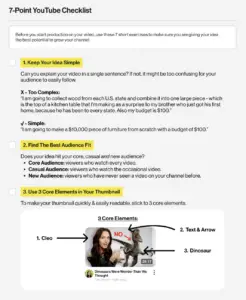
Download the 7 Point YouTube Checklist
This checklist comes from Colin & Samir, two guys who’ve spent years studying what separates channels that grow from channels that stall. It covers the fundamentals: finding your angle, packaging so people actually click, keeping viewers watching past the first ten seconds, and treating your channel like a business instead of a hobby. Whether this is your first video or your fiftieth, it’s worth getting the basics right before you chase the algorithm.
CONTENT ADVICE in Depth
Samir Chaudry Full Interview
Reference for packaging, positioning, and brand strategy.
- Three rules of YouTube:
- If they don’t click, they don’t watch.
- Respect their time.
- Give them more.
- Spend 75–80% of production time on title & thumbnail, not filming
- Match content to 3 things: who it’s for, how you want them to feel, what you want them to do next
- Track returning viewers, not total views — that’s the real signal of a growing audience
- High views ≠ a brand. Brand is trust, consistency, and reputation — the thing that actually gets paid
- On sponsorships: ask “what does success mean to you?” before agreeing to anything
ADVANCED CONTENT systems
Claude Code for YouTube Production
Reference for speeding up scripting, ideation, and uploads using AI tools.
- Validate video ideas by looking for small channels that got outsized views — that means the idea works, not the creator
- Title, thumbnail, and intro (first 30 seconds) all need to tell the same story
- Talk your script out loud before typing — keeps it sounding like you
- Use AI to speed up editing (cutting dead air), never to fully automate it
- Write your own upload package (description, tags, pinned comment) — most creators skip this and it costs them views
- AI can prep everything around you; it can’t replace you on camera